
Do you spend hours, or even entire days, manually entering invoices into your accounting system? You are not alone. Many small and medium-sized businesses in Quebec and across Canada invest valuable time in repetitive tasks that could be automated. Nicobois, a Quebec-based company, decided to solve this problem by automating its accounting process with artificial intelligence. The result: no more manual data entry, no more errors, and more time to focus on what really matters—growth and strategy.
In this article, you will discover the three concrete steps Nicobois took to transform its financial process, why team training is essential, and how you can draw inspiration from this approach to optimize your own organization.

The problem: 2 to 3 days lost each month
During a recent conversation with an SME manager, a striking observation emerged: his team spent two to three full days each month entering invoices into the accounting system. Despite all this time invested, errors still crept into the data.
Think about it for a moment. It's not just wasted time—it's energy and resources that could be invested elsewhere:
- In innovation and process improvement
- In customer support
- In human resources development
- In strategic analysis and business intelligence
Entering data manually is not an activity that directly contributes to the growth of your business. It is a necessary evil... or at least it was before automation.
The three concrete steps followed by Nicobois
Nicobois adopted a structured and pragmatic approach to solving this problem. Here's how they did it.
Step 1: Identify the most costly process
Before looking for a technological solution, Nicobois took the time to measure and document where the real costs were within their organization.
Mini checklist to identify your priority process:
- Measure the actual time spent on each repetitive task (invoice entry, data entry, manual reports, etc.).
- Keep track of repeated errors and their impact (corrections, delays, frustration).
- Assess the cost in terms of human resources (salaries, team morale)
- Identify the tasks that prevent your team from working on high value-added activities.
For Nicobois, it was clear: manually entering invoices was the most time-consuming, costly, and frustrating process.
Step 2: Choose the right tool (OCR + AI)
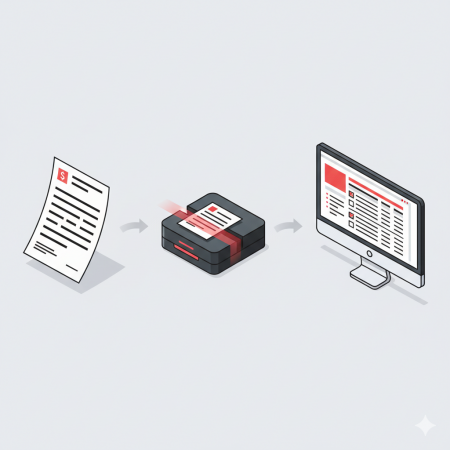
Once the problem had been clearly defined, Nicobois opted for an optical character recognition (OCR) tool coupled with artificial intelligence. This type of solution:
- Scan invoices (paper or digital)
- Automatically extracts data (amounts, dates, suppliers, etc.)
- Integrates them directly into the existing accounting system
- Learns over time to improve accuracy
The major advantage? No need to start from scratch. The tool integrates with popular accounting systems used by SMEs (QuickBooks, Sage, Xero, etc.), making it easy to adopt.
Key points to remember:
- Choose a tool that integrates with your existing infrastructure
- Check compatibility with your current systems
- Choose solutions designed for SMEs (cost, simplicity, support)
- Ensure that the provider offers support in French.

Step 3: Build the team and create a knowledge base
Nicobois didn't just implement a tool and hope for the best. They trained their team and, most importantly, created a knowledge base.
A knowledge base is a mini-intranet or collection of documents, videos, and practical guides that employees can consult at any time to:
- Learn at their own pace
- Solve common problems
- Share tips with coworkers
- Continuously improve the use of the tool
This approach reduces resistance to change, promotes adoption, and allows the team to become self-sufficient. Better yet, employees become ambassadors for change and suggest improvements themselves.
Mini checklist for successful adoption:
- Organize initial training with the team
- Create visual guides and short videos (2-3 minutes)
- Designate an internal champion who can answer questions.
- Encourage feedback and adjust as needed
- Celebrate early successes to boost motivation
Results: More time for business intelligence
Thanks to automation, the Nicobois team no longer spends entire days entering data. They can now devote their time to higher value-added activities:
- Data analysis: identifying trends, spotting opportunities for savings
- Business Intelligence (BI): Making strategic decisions based on reliable data
- Supplier relations: negotiate better terms thanks to greater visibility on costs and deadlines
- Continuous innovation: proposing further organizational improvements
Artificial intelligence does not replace employees—it does their repetitive work and frees up their creative and strategic potential.

Step 3: Build the team and create a knowledge base
Nicobois didn't just implement a tool and hope for the best. They trained their team and, most importantly, created a knowledge base.
A knowledge base is a mini-intranet or collection of documents, videos, and practical guides that employees can consult at any time to:
- Learn at their own pace
- Solve common problems
- Share tips with coworkers
- Continuously improve the use of the tool
This approach reduces resistance to change, promotes adoption, and allows the team to become self-sufficient. Better yet, employees become ambassadors for change and suggest improvements themselves.
Mini checklist for successful adoption:
- Organize initial training with the team
- Create visual guides and short videos (2-3 minutes)
- Designate an internal champion who can answer questions.
- Encourage feedback and adjust as needed
- Celebrate early successes to boost motivation
Results: More time for business intelligence
Thanks to automation, the Nicobois team no longer spends entire days entering data. They can now devote their time to higher value-added activities:
- Data analysis: identifying trends, spotting opportunities for savings
- Business Intelligence (BI): Making strategic decisions based on reliable data
- Supplier relations: negotiate better terms thanks to greater visibility on costs and deadlines
- Continuous innovation: proposing further organizational improvements
Artificial intelligence does not replace employees—it does their repetitive work and frees up their creative and strategic potential.

- Identify the most costly process (time + errors + frustration)
- Choose a tool that fits your existing infrastructure
- Build your team and create a knowledge base to promote adoption
- Measure results and reinvest profits in further innovations
Would you like to receive a monthly video, article, and practical tool to optimize your SME? Subscribe to the newsletter or contact me to discuss your digital transformation project.
Frequently Asked Questions
Q1: How much does an OCR tool cost for small and medium-sized businesses?
A: Costs vary depending on invoice volume and features, but several Canadian solutions offer affordable monthly rates starting at CA$50–100 per month for small businesses.
Q2: Does OCR work in Quebec French?
A: Yes, the best modern OCR tools support Canadian French and adapt to local terminology (GST, QST, Quebec suppliers, etc.).
Q3: How long does it take to implement an OCR system?
A: Depending on the complexity, the initial implementation usually takes between 2 and 6 weeks, including configuration, training, and adjustments.
Q4: Will automation eliminate jobs in my team?
A: No, automation frees employees from repetitive tasks so they can focus on analysis, strategy, and continuous improvement—activities that are much more rewarding and useful to the company.
