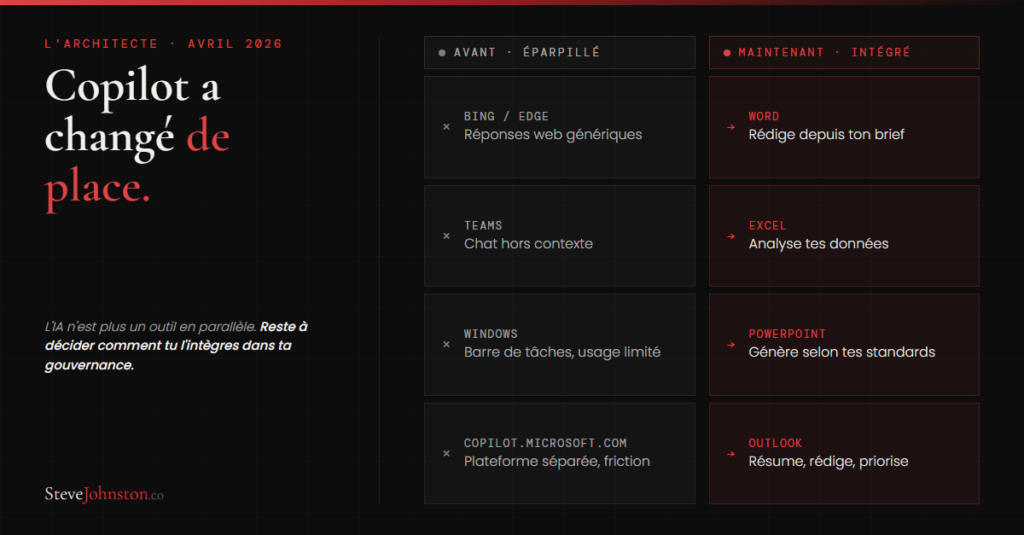
For two years, Microsoft Copilot was everywhere in print but nowhere to be found in actual workflows. Bing, Teams, Windows, and a separate platform at copilot.microsoft.com. Six different entry points for a tool that’s supposed to simplify everyday life.
The result on the ground: teams weren’t using it. Not because they were resistant to it. It was simply because the tool wasn’t where the work was being done.
Wave 3 changes the underlying structure.
What's New in Wave 3
The Copilot agent is now integrated into the four tools that most SME teams use on a daily basis:
Word. Copilot drafts initial versions based on a brief, summarizes long documents, and rewrites them in a specific tone. It works directly within the file, not separately.
Excel. It analyzes existing data, generates formulas, and identifies trends. The user describes what they’re looking for in natural language, and Copilot carries it out.
PowerPoint. It creates presentations based on a reference document, adhering to existing templates and visual guidelines.
Outlook. It summarizes long email threads, drafts replies, and prioritizes the inbox based on context.
The difference from previous versions: Copilot is no longer a separate platform that you open on its own. It’s integrated into the workflow, right when the decision is being made.
For Microsoft 365 users, this means that AI is now integrated into their files, data, and communications—not just sitting on the sidelines.
Why didn't the previous versions work?
It’s not a matter of technology. The language model behind Copilot was competitive. The problem was the integration.
I’ve been testing Copilot regularly since its launch—both for my own projects and for those of my clients. What I’ve observed is that tools like Claude or ChatGPT delivered better results in real-world work environments, not because Microsoft’s technology was lagging behind, but because the integration point was poorly chosen.
Just because a tool is available doesn't mean it's the right tool for the job.
What was missing: integration into the decision-making process, not just on the sidelines. That’s what Wave 3 addresses.
The real question for an SME regarding M365
If your infrastructure is already based on Microsoft 365, the question is no longer “which AI tool to adopt.” That decision has practically been made for you. Copilot is already part of your environment.
The question is: What governance measures are you putting in place now that AI is already in your files?
This isn't just a theoretical question. It's an immediate operational issue.
Access and permissions. Which files can Copilot read to generate its responses? If your SharePoint permissions aren’t up to date, employees could receive responses based on sensitive documents they shouldn’t have access to.
Organizational memory. Copilot relies on the data in your M365 tenant. If your documents are poorly structured, misnamed, or scattered, the AI cannot derive any value from them. The quality of the output depends directly on the quality of the structured input.
Accountability for decisions. When a manager uses Copilot to draft a customer response or summarize a financial report, who is responsible for the content? Governance must address this before it becomes a problem.
Practical training, not just technical. Simply having Copilot in Word isn’t enough. Teams need to know how to craft an effective brief, when to trust the output and when to review it, and how to integrate AI into existing processes without disrupting workflows that are already working well.
What I observe in the field
In the small and medium-sized businesses I work with, the situation is often the same. The M365 infrastructure is already in place. Copilot licenses are either already in use or in the process of being acquired. But adoption is below its potential because the organizational structure wasn’t established before the rollout.
The tool is available. However, the framework needed to use it in a repeatable, controlled, and cost-effective manner is not yet in place.
This isn't a technological failure. It's an architectural issue.
The companies that will get the most out of Copilot Wave 3 aren’t the ones with the best technology. They’re the ones that have structured their environment before deployment: organized documents, up-to-date permissions, documented processes, and clear roles for using AI.
Lead before equipping. That’s the approach that yields lasting results.
Where to start
1. Who has access to what in SharePoint? A quick audit of permissions often reveals significant discrepancies between what is intended and what actually exists. Copilot will use these permissions as they are, not as they should be.
2. How good is your internal documentation? If procedures, templates, and strategic decisions aren’t documented and accessible in M365, Copilot can’t help with them. AI enhances what’s already there; it doesn’t make up for what’s missing.
3. Who on your team is ready to lead the adoption effort? Not a pure IT specialist, and not a generalist. Someone who understands business workflows and can bridge the gap between the tool’s capabilities and the teams’ actual needs.
The substantive decision
Microsoft Copilot Wave 3 is a successful integration. For SMBs already using M365, it’s the best version of AI available for everyday work.
But technical integration isn't enough. The tool is in place. The governance work, however, still needs to be done in most organizations.
What sets apart an SME that derives real value from Copilot from one that pays for licenses without seeing results isn’t the technology. It’s the structure put in place before deployment.
AI is now in your files. The question is whether you’ve structured it in a way that makes it an asset.
To receive the weekly analysis on AI and digital transformation for SME leaders, sign up for L’Architecte.
